


Turnstile With RFID For Office: How RFID Access Really Works

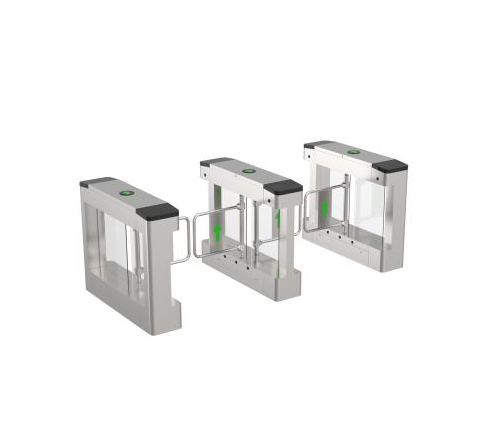
Turnstile with RFID for office entrances work best when you understand one simple truth: RFID is not only a "card swipe"—it is a rule engine that decides who can pass, in which direction, and under what timing and safety conditions.
At Turboo, we design office lanes like the RFID and QR Code Integrated BLDC Swing Gate Y348 for daily reality: busy mornings, visitors who need temporary access, and security teams who must enforce rules without slowing people down. This article focuses on how RFID access really works, step by step, in a way beginners can follow.
RFID Basics: What Your Turnstile Is Reading
RFID stands for Radio Frequency Identification. In office access, it usually means a badge (IC/ID card) contains an ID number that can be read by a nearby reader without contact. The important point is: the badge does not "open the gate" by itself. It only provides an identity token.
In a well-configured Turnstile with RFID for office, the reader captures that token and sends it to an access controller (or an integrated control board). The controller then checks rules such as:
✓ Is this card valid and active?
✓ Is the person allowed at this time (schedule control)?
✓ Which direction is permitted (entry only, exit only, or both)?
✓ What should happen if the user does not pass within the allowed time?
So RFID is the "who," and the controller is the "decision maker." The gate is simply the "action."
From RFID Tap to Passage: The Real Access Workflow
If you want to explain RFID to a new facility manager, describe it like a clean sequence. When an employee taps their badge on a Turnstile with RFID for office, the lane performs a short checklist and then monitors the passage zone until the cycle ends.
A typical RFID cycle looks like this:
• RFID Credential Presented
The user taps or presents the IC/ID badge. The reader captures the credential ID.
• Permission Check Happens In Milliseconds
The controller checks authorization rules, direction rules, and current mode.
• Gate Releases And Moves Smoothly
On Turboo Y348, a BLDC drive supports smooth operation and low noise, which matters in office lobbies where sound quality affects perception.
• Sensors Confirm "One Person Passed"
RFID alone cannot confirm the physical movement. Sensor logic verifies that one person moves through the lane.
Lane Returns To Locked State
After passage, the system restores the locked state to be ready for the next RFID event.
This is why RFID access feels simple for users, but is highly structured behind the scenes.
RFID "Card Memory" Explained: Why It Changes Peak-Hour Behavior
One of the most practical RFID settings in an office turnstile is card "with memory" vs "without memory." This is not a marketing term. It is a real logic choice that changes how the lane behaves when people hesitate.
• With Memory
With memory enabled, the Turnstile with RFID for office temporarily keeps the authorization state after a valid RFID read. If a user taps correctly but takes a moment to step through, the lane still allows the passage within the configured time window. This is often used to keep traffic flowing during peak hours.
• Without Memory
Without memory means the authorization is not held. If the user does not pass correctly, they may need to tap again. This can be preferred in stricter environments where you want each passage to be tightly paired with one clean RFID-triggered action.
For beginners, the takeaway is simple: RFID memory is not about data storage—it is about user experience and rule strictness.
RFID Timing and Auto Reset: The Rule That Prevents "Stuck Open" Lanes
Another RFID concept that many first-time buyers miss is timing. A professional Turnstile with RFID for office needs a rule for what happens if someone is authorized but does not pass.
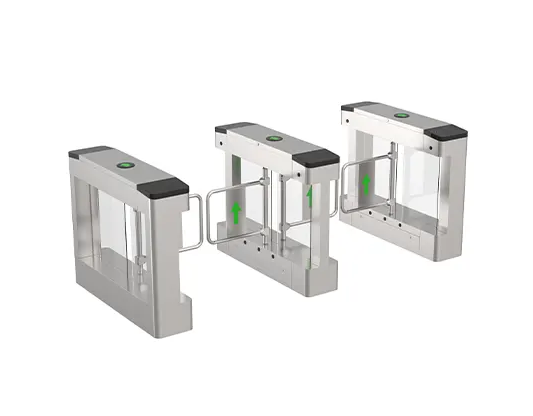
Turboo Y348 supports an automatic reset function: after access is granted, the gate automatically restores to the locked state if the person does not pass within the set time. This matters for office security because it prevents common issues:
✓ Someone taps RFID, then walks away
✓ A user taps too early while waiting for a colleague
✓ A visitor gets confused and pauses in front of the lane
Auto reset is a quiet but important RFID control discipline. It protects the doorway without needing staff intervention.
RFID Security Rules: Anti-Tailgating and Anti-Reverse Passing
RFID identifies a person, but it does not guarantee correct behavior. That is why modern systems combine RFID authorization with physical-rule enforcement.
Anti-Tailgating (Anti-Tail)
Anti-tailgating protects against "two people, one RFID tap." The lane expects one authorized RFID event → one person passing. If a second person tries to follow closely, the system can respond based on the configured policy.
✓ Reduces badge sharing and unauthorized following
✓ Helps keep employee-only zones consistent
✓ Makes security rules predictable, not dependent on guards
Anti-Reverse Pass
Anti-reverse pass prevents wrong-way movement through the lane. After RFID authorization for one direction, the lane blocks movement in the opposite direction through that same passage. This helps prevent mid-lane turnarounds and abnormal behaviors that can create safety and security gaps.
Together, these rules turn RFID from "identity check" into access behavior control.
RFID-Friendly Comfort and Safety: Why Sensors Matter in Offices
Office entrances need to feel safe. This is where sensors support RFID systems. Turboo Y348 includes infrared anti-clip logic, which helps prevent clipping when the gate is open or moving.
Why does this belong in an RFID guide? Because RFID access must remain safe even when users are not perfect. People carry laptops, hold coffee, or guide visitors. The lane must handle real behavior without turning security into stress.
✓ Infrared anti-clip helps reduce pinching risk
✓ Smooth BLDC motion improves comfort and perceived quality
✓ Reliable design supports long service life for continuous daily use
In an office, comfort is not "extra." It directly affects adoption. When the lane feels calm and predictable, people comply with RFID rules naturally.
RFID Deployment Tips: Modes and Integrations That Scale
A good Turnstile with RFID for office should not force you into one workflow. Turboo Y348 supports open or closed operation and working modes such as two-way card reading and one-way card reading.
Practical examples:
• Two-way RFID for main staff entrances
• One-way RFID for restricted zones (entry controlled, exit free)
• Time-based open mode for events, then switch back to RFID control
It is also compatible with multiple credential methods: IC/ID card, scanning, and face recognition (depending on the access platform). Many offices start with RFID for staff, then add QR for temporary visitors later—without redesigning the lane.
CTA (Call To Action): If you are selecting a Turnstile with RFID for office, send Turboo your entrance width, expected peak-hour flow, and whether you prefer RFID with memory or without memory. We can recommend the right Y348 configuration—timing window, anti-tailgating, anti-reverse rules, and sensor safety settings—so RFID access works smoothly from day one.