


Tripod Turnstile System: How It Works, Components & Full Guide

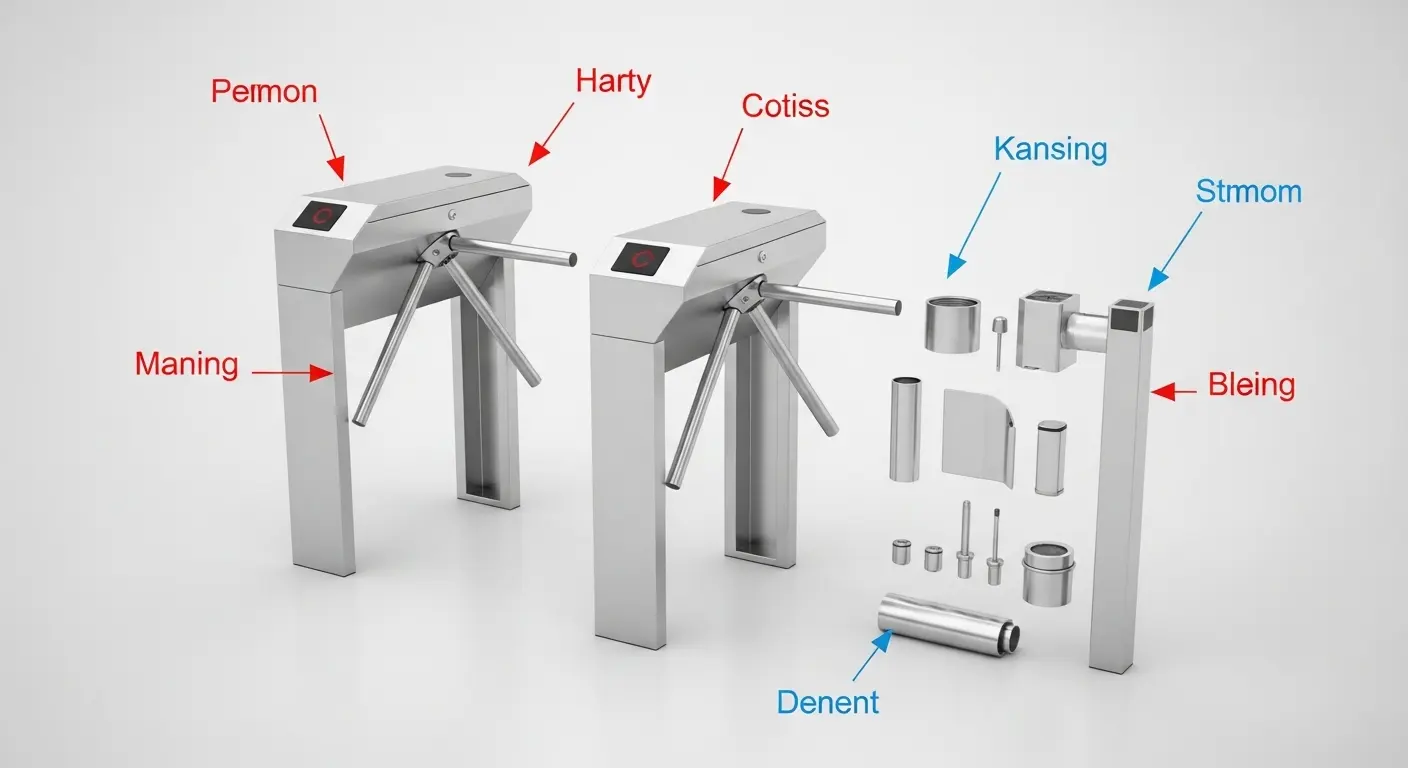
A tripod turnstile system is not just a gate. It is a coordinated set of hardware, electronics, and software that controls, logs, and reports every single pedestrian entry and exit event at your facility. When all components are correctly specified and integrated, the system runs silently in the background — managing access, feeding attendance data, and blocking unauthorized entry without any staff intervention.
When it is mis-specified or poorly integrated, it creates queues, false alarms, and maintenance headaches. This guide walks you through every layer of a complete tripod turnstile system so you can deploy with confidence.
The Five Core Components of a Tripod Turnstile System
Understanding what each part does — and what quality looks like in each component — is the foundation of any smart procurement decision.
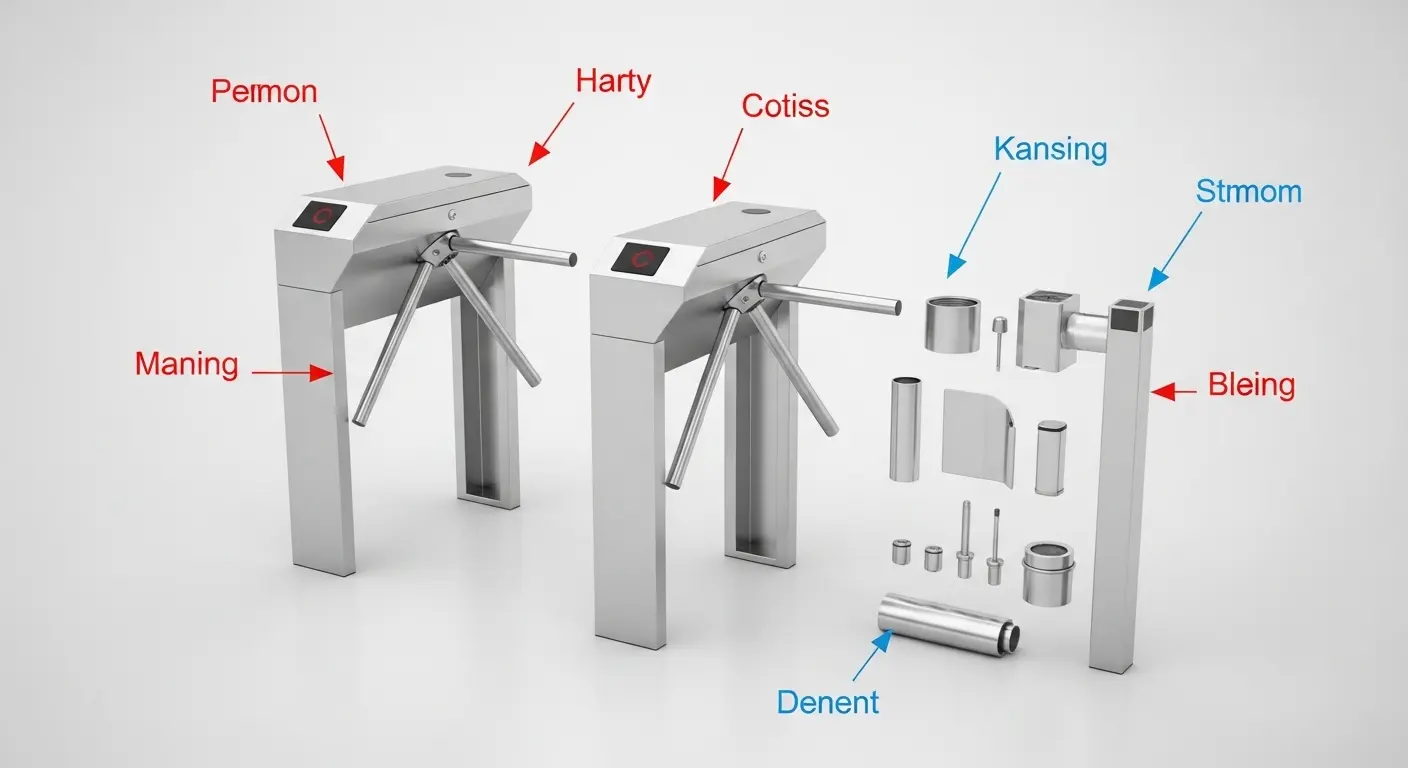
1. Cabinet (Chassis)
The cabinet is the structural housing of the entire tripod turnstile system. Commercial-grade cabinets use SUS304 stainless steel with a minimum wall thickness of 1.0mm (body) and 1.2mm (top panel). Full-weld construction eliminates seam gaps, maintaining cabinet geometry and IP rating integrity under years of heavy use. Thinner walls or assembled construction compromise both.
2. Mechanism Core
The mechanism is the heart of the system. It contains the transmission shaft, gears, springs, and either a solenoid (semi-automatic) or brushless DC motor (fully automatic). The mechanism handles every arm rotation. In a system processing 500–1,000 passes per day, mechanism durability is not a detail — it is the primary long-term cost driver. Turboo's commercial mechanisms are rated for 5 million+ arm rotations.
3. Drive Control Board (PCB)
The control board is the intelligence layer of the system. It receives access signals from the credential reader, manages arm release timing, enforces anti-tailgating and anti-reverse logic, activates the LED status indicator, handles the fail-safe drop-arm function, and outputs event data via RS485 to connected software platforms.
Control board capabilities to verify before purchase:
- Dry contact input (works with any third-party reader)
- RS485 two-way communication (required for real-time data logging)
- Wiegand input support (for legacy system compatibility)
- Configurable reset timer (1–10 seconds)
- Memory mode on/off (controls multi-pass credential behavior)
- External alarm output terminal
4. Rotating Arms
Three stainless steel arms — SUS201 or SUS304 — arranged at 120° intervals. Standard arm length is 500mm. The arms serve as the physical barrier. They must be rigid enough to resist forced entry attempts, smooth enough to allow easy user push-through, and balanced precisely enough to reset to the correct locked position every single time.
5. Reader and Credential Interface
The credential reader is technically a separate device, but it is an integral part of the tripod turnstile system. The reader validates the credential and sends a signal to the control board. Reader type determines which credentials the system accepts — and therefore which users it can handle. Turboo's systems support IC/ID card, NFC, QR code, barcode, fingerprint, face recognition, temperature detection, and coin/token inputs.
For a full overview of Turboo's complete gate range, explore the tripod turnstile product page.
How a Complete Tripod Turnstile System Works: End to End
Here is the complete operational sequence — from credential tap to data output:
Step 1 — Credential Presentation
The pedestrian presents a credential to the mounted reader. The reader validates it against its local database or a connected server.
Step 2 — Signal Output
The reader sends a dry contact relay closure or RS485 command to the turnstile control board. This signal must last 1 second or less — any longer causes the gate to remain unlocked beyond one arm rotation, creating a security gap.
Step 3 — Arm Release or Drive
The control board activates the solenoid release (semi-automatic) or triggers the brushless motor (fully automatic). The arm becomes free to rotate.
Step 4 — Passage
The authorized pedestrian pushes through (semi-auto) or the arms rotate automatically (full auto). One 120° rotation. One person passes.
Step 5 — Auto-Reset
The gate returns to locked position immediately after passage or after the configured reset timer expires if no one passes. The system is ready for the next credential event.
Step 6 — Event Logging
The control board sends the pass event — credential ID, timestamp, direction, and lane ID — via RS485 to the connected access management or attendance software. This data feeds reports, triggers alerts, and updates dashboards in real time.
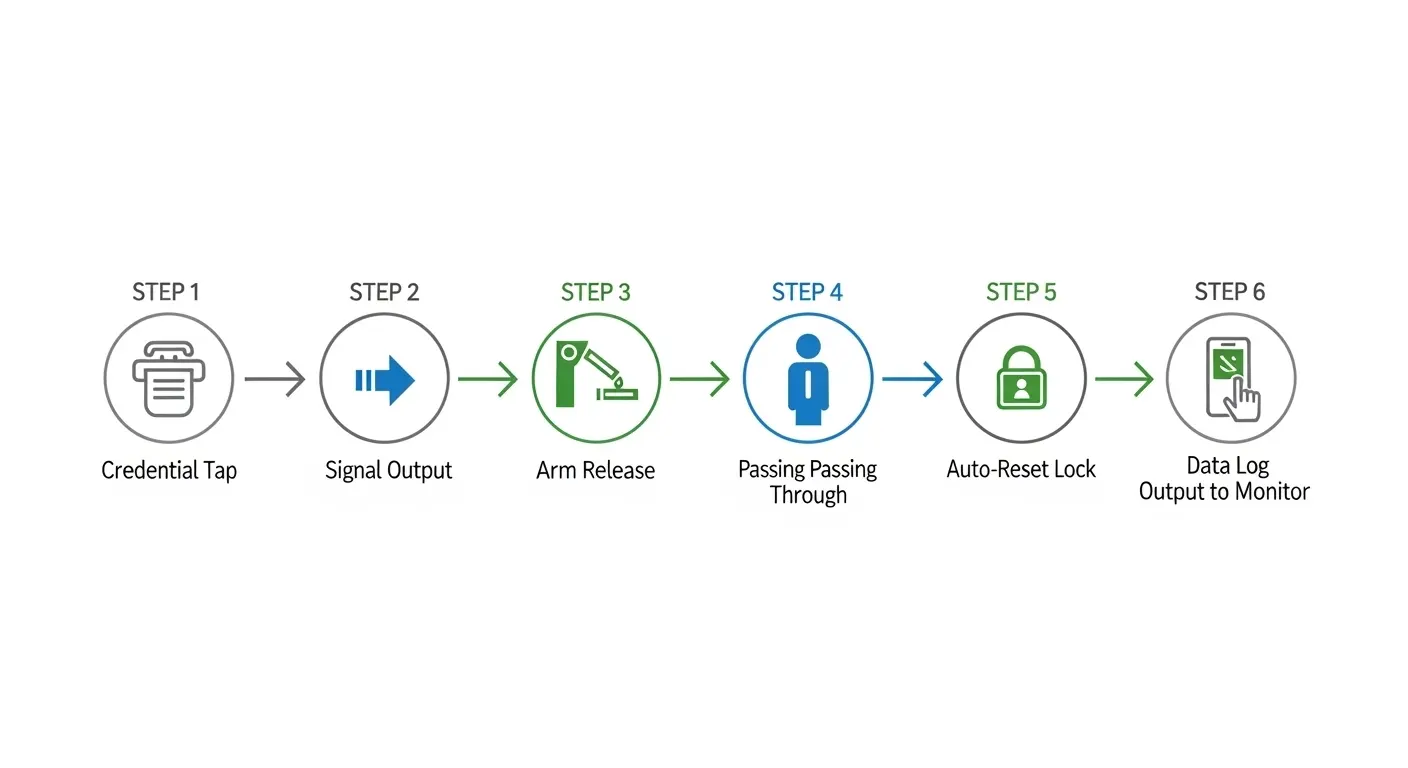
This six-step cycle runs thousands of times per day without human supervision in a well-configured tripod turnstile system.
System Configuration Modes Explained
Most buyers never look at these settings — and then encounter operational problems that could have been prevented in 10 minutes at commissioning. Understanding your system's configuration options is as important as the hardware itself.
Memory Mode On vs. Off
Memory mode ON: The control board remembers multiple valid credential signals and processes them in sequence. If three employees tap cards in rapid succession, the gate unlocks three times in sequence. This is correct for high-speed badge readers where taps arrive faster than the gate cycle completes.
Memory mode OFF: One valid signal = one passage. The next credential is only processed after the current passage cycle completes. This is tighter from a security standpoint and correct for higher-security environments where strict one-tap-one-pass control is required.
Reset Timer
The reset timer defines how long the gate remains unlocked after a valid access signal before returning to locked position if no one passes. A timer too short creates false lockouts for slow pedestrians. A timer too long creates a security gap. For most commercial applications, 3–5 seconds is the correct range. Outdoor entrances with longer approach distances may require 5–8 seconds.
Anti-Reverse Mode
When active, the system detects and blocks any attempt to push through the arm in the unauthorized direction. This is non-negotiable for any security-sensitive installation. Confirm this mode is active at commissioning by attempting a deliberate reverse push.
The Software Layer: What Happens After the Gate
This is the most overlooked component of a tripod turnstile system in most procurement conversations — and one of the most commercially valuable.
A gate that logs nothing is just a physical barrier. A gate connected to management software becomes a data asset.
What the software layer delivers:
- Real-time attendance data — every pass event logged with credential ID, time, date, and direction. This feeds payroll, HR reports, and audit trails without manual input.
- Access permission management — add, revoke, or schedule credential permissions from a central dashboard across multiple gates and sites.
- Alert and alarm outputs — illegal entry attempts, tailgating detection, forced arm events, and power failures trigger instant alerts to a monitoring station or security team.
- Throughput analytics — pass counts per lane, per hour, per day. This data directly informs staffing decisions, lobby layout adjustments, and lane count planning for expansion.
- Visitor management integration — pre-registered visitor QR codes, temporary access windows, and automatic expiry all managed from one platform.
For office building deployments where visitor management and HR attendance integration are primary requirements, Turboo's tripod turnstile for office building page covers system configuration for multi-tenant commercial properties in detail.
Choosing the Right Tripod Turnstile System for Your Environment
Different deployment environments demand different system configurations. Here is how to match the right Turboo system to your site:
Corporate Office Buildings
Requirements: Quiet operation, RS485 attendance integration, face recognition, premium lobby aesthetics.
Recommended: Turboo's full automatic tripod turnstile (LB123) — brushless DC motor, blue tempered glass cover, RGB indicator, face recognition compatible, RS485 output.
Factories and Industrial Sites
Requirements: High daily cycle rating, RS485 payroll integration, anti-tailgating for zone control.
Recommended: Turboo's bridge tripod turnstile (Y148) — 35–50 persons/minute, anti-pass back function, full RS485 integration, IC/ID, QR, and face recognition support.
Metro and Transit Stations
Requirements: High cycle counts, vandal-resistance, fare system integration, outdoor capability.
Recommended: Turboo's heavy-duty range paired with transit-compatible control board configuration. Turboo's dedicated tripod turnstile for metro station page covers transit-grade system configuration and fare media integration in full.
Schools and Universities
Requirements: Student ID card, QR code visitor access, optional face recognition, reliable daily performance.
Recommended: Turboo's heavy duty tripod turnstile range for main campus entrances, or standard bridge configurations for building-level access points.
RFID-Driven Multi-Site Systems
For facilities running multiple locations from a single credential database, Turboo's RFID-integrated systems connect all gates to one access management platform. The RFID tripod turnstile page covers multi-format card support, NFC compatibility, and cloud platform integration options.
How to Plan a Multi-Lane Tripod Turnstile System
Getting lane count wrong is one of the most expensive planning mistakes in access control. Here is the correct approach:
1. Measure your peak footfall
Count or estimate the number of people arriving in your single busiest 15-minute window. Multiply by 4 to get peak hourly footfall.
2. Calculate minimum lane count
Divide peak hourly footfall by gate pass rate per lane per hour. Semi-automatic: ~1,800 passes/hour. Full automatic: ~2,700 passes/hour.
3. Add redundancy
Always plan for one lane above minimum. A multi-lane system with zero redundancy means any single-unit service event brings the entry point to capacity or over.
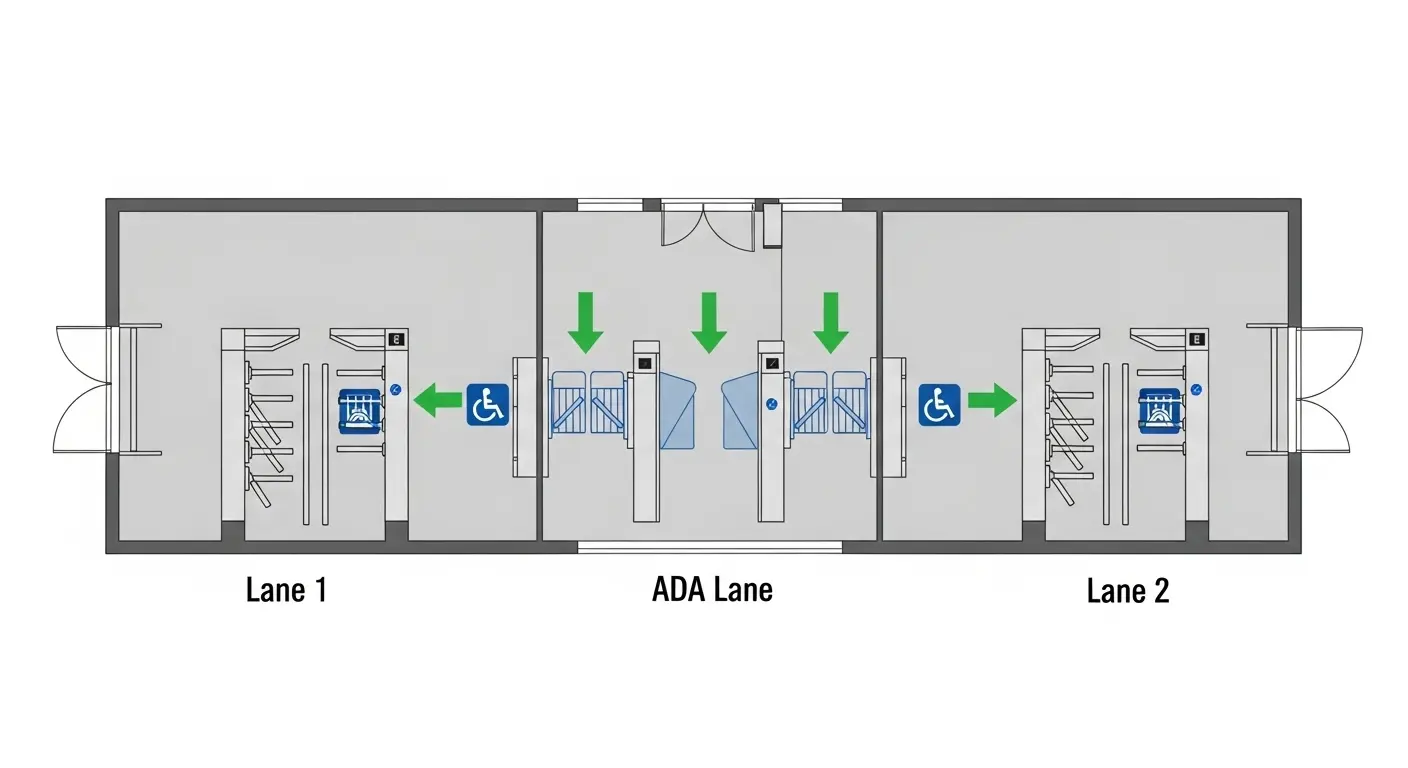
4. Plan for ADA compliance
At least one lane in any configuration should accommodate mobility device users. This typically means a wider passing lane (800mm+) adjacent to the tripod system — either a swing gate or flap barrier.
5. Map cable routes before installation
RS485 and power cables should run underground or in conduit to prevent damage and maintain a clean installation. For a step-by-step site preparation and installation walkthrough, Turboo's turnstile installation guide covers every stage from floor anchoring through commissioning and first-service.
FAQ: Tripod Turnstile System
What is a tripod turnstile system?
A tripod turnstile system is a complete pedestrian access control solution consisting of five integrated components: the stainless steel cabinet, the mechanism core, the drive control board, the three rotating arms, and the credential reader interface. Together, these components physically control passage, electronically verify credentials, log every pass event, and output real-time data to connected access management or attendance software.
What communication protocols does a tripod turnstile system use?
The three main protocols are dry contact (relay closure — compatible with virtually every third-party reader), RS485 (two-way serial communication for real-time data logging and access management integration), and Wiegand (26-bit or 34-bit — supported for legacy system compatibility). Turboo's control boards support all three as standard.
How does the anti-tailgating function work in a tripod turnstile system?
The physical three-arm mechanism enforces one 120° rotation per valid credential signal. One rotation allows passage for one person width only. The gate immediately resets and locks after that rotation completes. Additionally, the control board's anti-reverse function detects and blocks any attempt to push the arm in the unauthorized direction.
Can a tripod turnstile system work with multiple credential types simultaneously?
Yes. Turboo's control boards accept signals from IC/ID cards, NFC, QR codes, barcodes, fingerprint terminals, face recognition cameras, temperature detection systems, and coin/token acceptors — all via dry contact or RS485. Different credential types can operate concurrently on the same system without additional hardware.
What happens to a tripod turnstile system during a power failure?
The fail-safe drop-arm function activates automatically — all arms fall to the horizontal position, enabling free, unrestricted pedestrian evacuation. This function operates independently of the control board and does not require power to activate. It satisfies fire safety regulations in most commercial and public building jurisdictions globally.
How do you set the correct reset timer for a tripod turnstile system?
The reset timer should be set to 3–5 seconds for most commercial indoor deployments. Outdoor or long-approach entries may require 5–8 seconds. The third-party reader's relay lock duration must be set to 1 second or less to prevent the gate from remaining unlocked across multiple rotation cycles — this is configured in the reader's access controller, not in the turnstile itself.