



Contactless Turnstile Access Explained: LED Indicators, Card Memory, Auto Reset Benefits

Contactless Turnstile Access is reshaping how buildings manage entry, safety, and compliance in a fast-moving world. The pressure is familiar: protect people and assets without creating bottlenecks or confusion. Done right, contactless turnstiles do both. They cut touchpoints, support multi-factor checks, and give security teams clear, measurable control over flow. If you are upgrading legacy gates, this guide shows how to get the most from LED guidance, card memory settings, auto reset, and integrations with cards, scanning, and face recognition – plus what to consider for outdoor durability, throughput, and ROI.
Why Contactless Turnstile Access Matters Now
Visitor volumes are rising, work patterns are mixed, and leaders want audit-ready records. The modern tripod turnstile, especially with a brushless motor, meets this moment: smoother rotation, lower noise, and a long service life that reduces maintenance. In day-to-day use, the difference shows up as fewer mis-scans, less staff intervention, and a calmer lobby.
Throughput is a useful lens. Under typical office conditions, a single tripod lane can process roughly 35 – 50 people per minute. But small inefficiencies add up quickly. A one-second pause at the reader can shave a couple of people per minute off peak capacity. That’s why visual cues, clear control logic, and automatic recovery features are not “nice to have” – they’re the levers that maintain speed without sacrificing security.
LED Indicators: Visual Guidance That Keeps People Moving
LED indicators do quiet, consistent work. A confident green after a valid credential tells users to proceed; a clear red stops an invalid attempt before someone pushes. That instant feedback eliminates guesswork and cuts hesitation, especially for first-time visitors who may be anxious at a turnstile.
This simple light logic also helps with crowd management. During a morning rush, dozens of tiny mistakes can ripple into a queue. With LED feedback, users correct themselves in real time, and staff can spot issues from across the lobby. Green lanes keep cycling; red alerts prompt staff to help, escalate, or perform a secondary check.
Key Payoffs:
• Operational: Faster decisions at the reader prevent downstream backups at elevators and reception.
• Security: Invalid attempts are obvious and auditable, enabling early intervention.
• Experience: Fewer verbal instructions, fewer second guesses, and a smoother flow for guests and employees.
Card Memory Modes: Fairness and Flow, Tuned to Your Risk
Most systems offer two credential modes that define what happens when multiple valid scans occur before the current passage finishes: with memory and without memory. Choosing the right mode preserves fairness and throughput without weakening enforcement.
When to Use Memory Mode:
Use memory mode when bursts of traffic are predictable – class changes, shift transitions, or event entries. In this setting, the lane “remembers” valid scans that occur while the arm is cycling. If someone taps a fraction too early, their turn is queued rather than lost. This prevents unnecessary re-tapping, moderates tempers, and preserves an orderly FIFO sequence.
• Benefit: Fair queue control and steady tempo under surges.
• Outcome: Fewer escalations, fewer re-validations, and reduced crowd stress.
When to Disable Memory:
Shut off memory in high-security lanes where a strict single-entry policy applies. A valid scan authorizes one movement; extra taps are ignored until the lane returns to ready. This mode hardens anti-tailgating, clarifies event logs, and makes for clearer investigations: one passage, one credential, one record.
• Benefit: Stronger anti-tailgating and more precise audit alignment.
• Outcome: Clean, attributable logs and easier incident review.
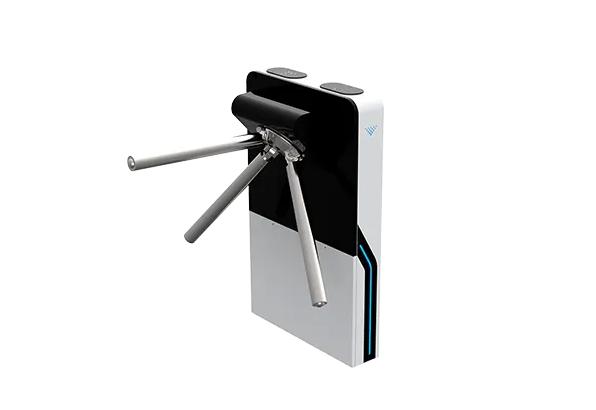
Auto Reset: Security That Recovers Gracefully
Exceptions happen. A user scans and answers a call; a delivery pauses at the threshold; a visitor steps back for help. Without automatic reset, a lane can remain unlocked after a valid scan, inviting misuse and confusion. Auto reset solves this by returning the lane to a locked state if no one passes within a set window.
Set the timer to fit the environment. In fast-moving office entries, a shorter reset window keeps cycles tight. In healthcare or logistics, where wheelchairs or carts may slow passage, a longer window is safer. Auto reset also aligns the physical barrier with the access control system’s logical state, preventing “ghost open” records and improving data quality.
Safety and Anti-Tailgating:
Auto reset closes the door on opportunistic tailgating. If the authorized user hesitates and doesn’t enter, the authorization times out and the arms lock back. Staff spend less time re-arming lanes, and the system enforces one person per cycle even amid confusion.
Integrations: Cards, Codes, Face Recognition, and a Unified Platform
Modern Contactless Turnstile Access isn’t only about opening and closing; it’s about connection. With a standard electrical interface and well-documented protocols, turnstiles can publish events, receive commands, and fit neatly into your existing access control and IT stack. That lowers project risk and preserves your investment as policies evolve.
Credential Options Can be Mixed by Risk:
• IC/ID cards for everyday employee access.
• QR or barcode scanning for temporary visitors or event passes.
• Face recognition, optionally combined with a card, for sensitive zones or fast, hygienic entry.
The same lane can support attendance tracking, time-and-labor rules, or fee collection if your policies require it. When requirements change, you update the software policy rather than replace the hardware – one more way to extend lifecycle value.
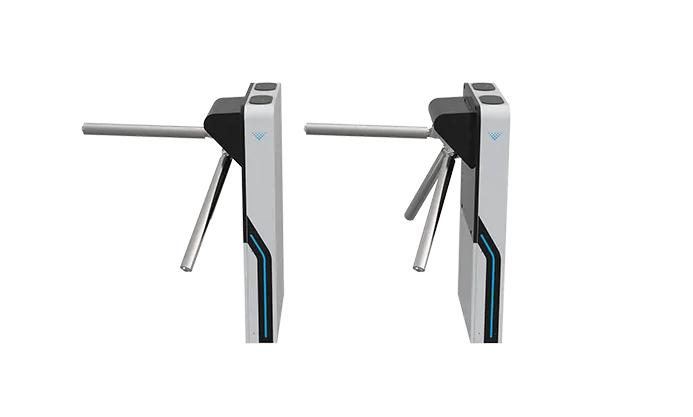
Built for the Elements: Long–Life Performance Inside or Out
Outdoor deployments set a higher bar for reliability. Seek sealed electronics, weather-resistant finishes, and a tough mechanism powered by a brushless motor. Brushless designs cut wear, enhance energy efficiency, and maintain low noise – important near neighborhoods or quiet academic areas.
Durability translates to uptime. Quality tripod mechanisms are commonly rated for millions of cycles, and vendors often publish mean cycles between failure measured in the five-to-ten million range, depending on conditions. Over years, those extra cycles show up as fewer service calls and a steadier user experience.
Throughput, ROI, and What the Numbers Mean
Return on investment comes from three places: a better machine core, clearer user guidance, and simpler integrations.
• Mechanism and motor: A professional-grade core with a brushless motor produces smooth rotation and low noise. The result is fewer jams, fewer “please try again” moments, and fewer technician visits.
• Visual and logic controls: LED indicators trim hesitation. Memory mode preserves fairness during surges. Auto reset eliminates stalled, unlocked states. Together, these add effective capacity without adding staff.
• Integration: A standard interface avoids one-off wiring and custom code. You can add modules for visitor processing or attendance later, and the same lanes scale from lobbies to stadium perimeters.
A practical example: If you lift a busy lane from 22 to 28 persons per minute during the morning peak, you compress queue time, ease congestion near elevators, and improve tenant satisfaction. Multiply that across multiple lanes and you have a measurable service improvement with minimal operational overhead.
Suggested Settings to Pilot
• Use a 3 – 5 second auto-reset for fast-paced office traffic; increase to 6 – 8 seconds for healthcare or logistics where users need longer to clear the arms.
• Run memory mode during turnover periods – shifts, classes, events – and turn it off in high-security lines that mandate single-person cycles.
• Ensure green/red LED mapping stays consistent across lanes and buildings to simplify training and speed choices.
Practical Deployment Tips
• Set readers at natural reach and approach angles to cut pauses and scanning errors.
• Align lane layout with real flow; a single properly configured unit can secure a full lane effectively.
• For the first week, monitor analytics in detail. Adjust reset durations, memory behavior, and LED timing based on observed patterns, not assumptions.
• Build a straightforward staff playbook: how to spot red-light patterns, when to assist, and when to escalate for a secondary check.
• At outdoor sites, check grounding, drainage, and sun exposure to protect electronics and maintain LED visibility.
Call to Action
Ready to modernize your entry with Contactless Turnstile Access? Request a consultation and live demo. We will map LED guidance, card memory policies, and auto reset settings to your real traffic, integrate with your existing access control, and deliver a low-noise, high-uptime experience indoors or outdoors. Turn your lanes into a secure, efficient, and data-ready front door.